Your cloud,
carried.
Nimbo keeps your Nextcloud in lockstep with your desktop — continuous two-way sync, on-demand files, and real-time updates, all from a tray icon that sips memory. Free for personal use.
One job, done exceptionally well.
No Electron bloat, no account wall, no telemetry. Nimbo lives in your tray and keeps your Nextcloud and your machine in step — fast.
In sync the instant it changes
Edit a file on either end and it's mirrored in moments. A three-way diff handles renames and moves as metadata — no re-uploads, even for huge files — and real-time notify_push means Nimbo reacts the moment your server changes, not on a timer.
Files without the disk cost
Make your whole account online-only — files show as placeholders that download when you open them. Keep what you want offline; free up space with a right-click.
Yours, on your server
No middleman account, no analytics, no phoning home — ever. Nimbo talks to your Nextcloud and nothing else.
Many accounts at once
Personal and work, side by side — each into its own folders, all kept current.
Nothing lost to a conflict
Edits on both ends keep both copies. Browse versions and restore from the trash, right in the app.
Sync only what you choose
Pick folders to sync, with per-folder excludes and global ignore patterns to keep junk out.
At home in Windows
A first-class citizen of the OS: your Nextcloud apps open as desktop apps with their own taskbar icons, the Windows 11 right-click menu (Share, Versions, Keep / Free up space), status overlays in Explorer, a sidebar entry, and updates that apply themselves.
Light and native
A compact (~28 MB) Go app that lives in the tray sipping memory — it uses the built-in Windows WebView, not a bundled browser like Electron.
Your whole cloud, in a tray flyout.
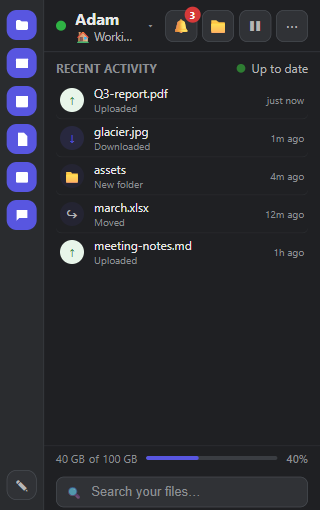
One click from the taskbar and there it is — live sync activity, every Nextcloud app a tap away, and your storage at a glance. No browser tab in sight.
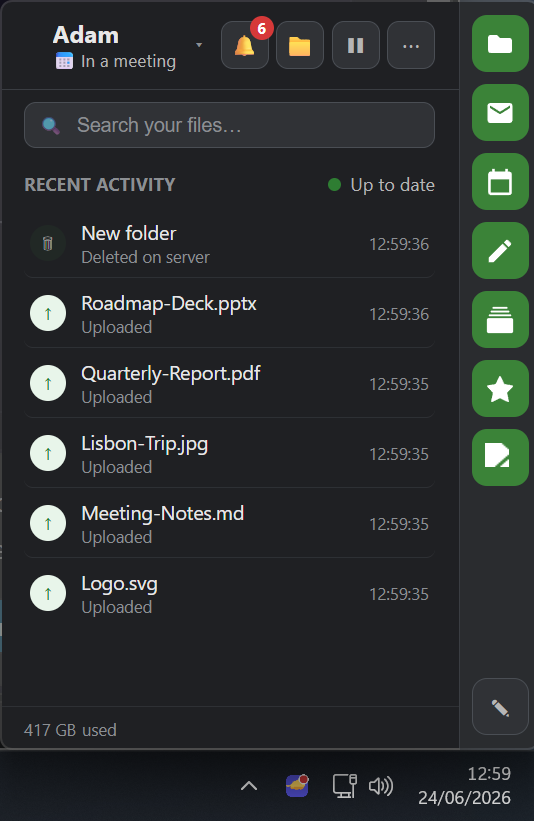
Recent activity, as it happens
Watch files upload and download in real time, then click any item to jump straight to its sync status.
Every app, one tap away
Files, Mail, Calendar, Notes and the rest of your server sit in a rail down the side — open any of them without hunting for a URL.
Find anything, instantly
Search your whole Nextcloud from the top of the flyout, with storage used shown right where you work.
Your Nextcloud apps, as desktop apps.
Click an app in Nimbo's dock and it opens like software you installed — its own window, its own taskbar icon — not another browser tab. No other Nextcloud client does this.
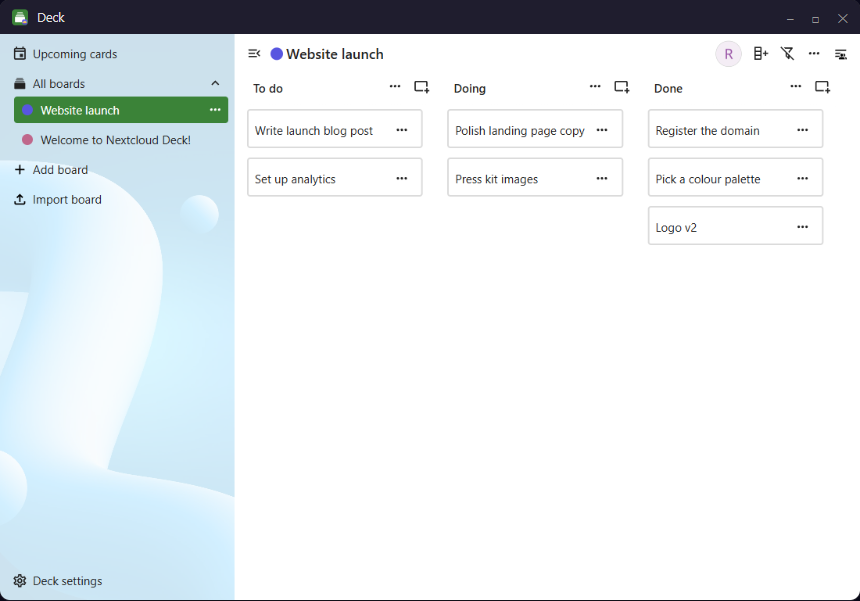
Own window, own identity
Deck, Mail, Calendar — each opens in its own window with the app's real icon on the taskbar, badged with a little nimbus so you know Nimbo's carrying it.
Pin them, launch them
Start-menu entries appear automatically. Pin an app to the taskbar and it launches straight into its window — like any installed app.
Just the app
Nextcloud's website chrome stays hidden, you sign in once, and every window remembers its size. It feels native because, to Windows, it is.
The things the stock client won't do.
Nimbo starts where the official Nextcloud desktop client stops — the panel bends to your taste, and the everyday frustrations are simply gone.
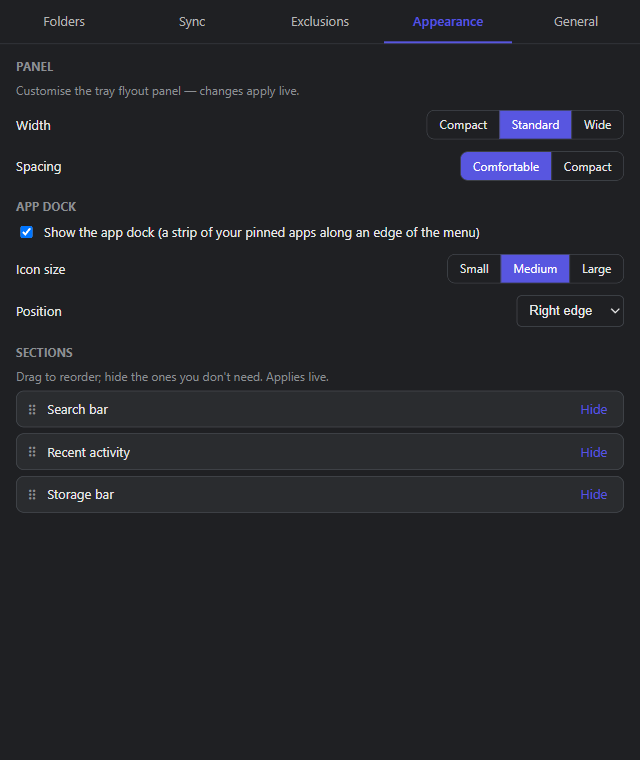
Make the panel yours
Resize the flyout, tighten the spacing, size the app dock and move it to any edge. Live preview, no restart.
Reorder or hide sections
Drag search, activity and storage into the order you want — or hide what you never look at. No other Nextcloud client lets you.
Dock on any edge
Right, left or a bottom strip; small, medium or large icons. Your pinned apps sit where they suit you.
Move a folder, keep the files
Relocate a synced folder to another drive and Nimbo moves the local files in place — no deleting and re-downloading gigabytes like the stock client makes you.
Set your status from the tray
Flip to Away or Do-not-disturb and set a message right from the flyout — it updates your Nextcloud presence. No browser tab needed.
Errors in plain English
When something can't sync, Nimbo says why in a sentence you can act on — grouped and de-duplicated, not a wall of cryptic paths.
Point it at your server.
Start syncing in a minute.
No account. No trial. No catch. Free for personal use.